
Metering and licensing
Bookend’s license is metered by closed loans, so the platform needs a count. It takes it from its own sealed-loan events, adds the number of document pages it received, and reports both in the smallest possible message to the Bookend metering endpoint configured in settings. The endpoint also validates the license key the message carries.
Administrators and managers see all of this on System → Metering & license; only administrators can send, generate or change anything there.
The heartbeat
Section titled “The heartbeat”Once a day (03:15 UTC, plus once right after activation and once shortly after the api starts on an activated install), Bookend posts to metering.endpoint:
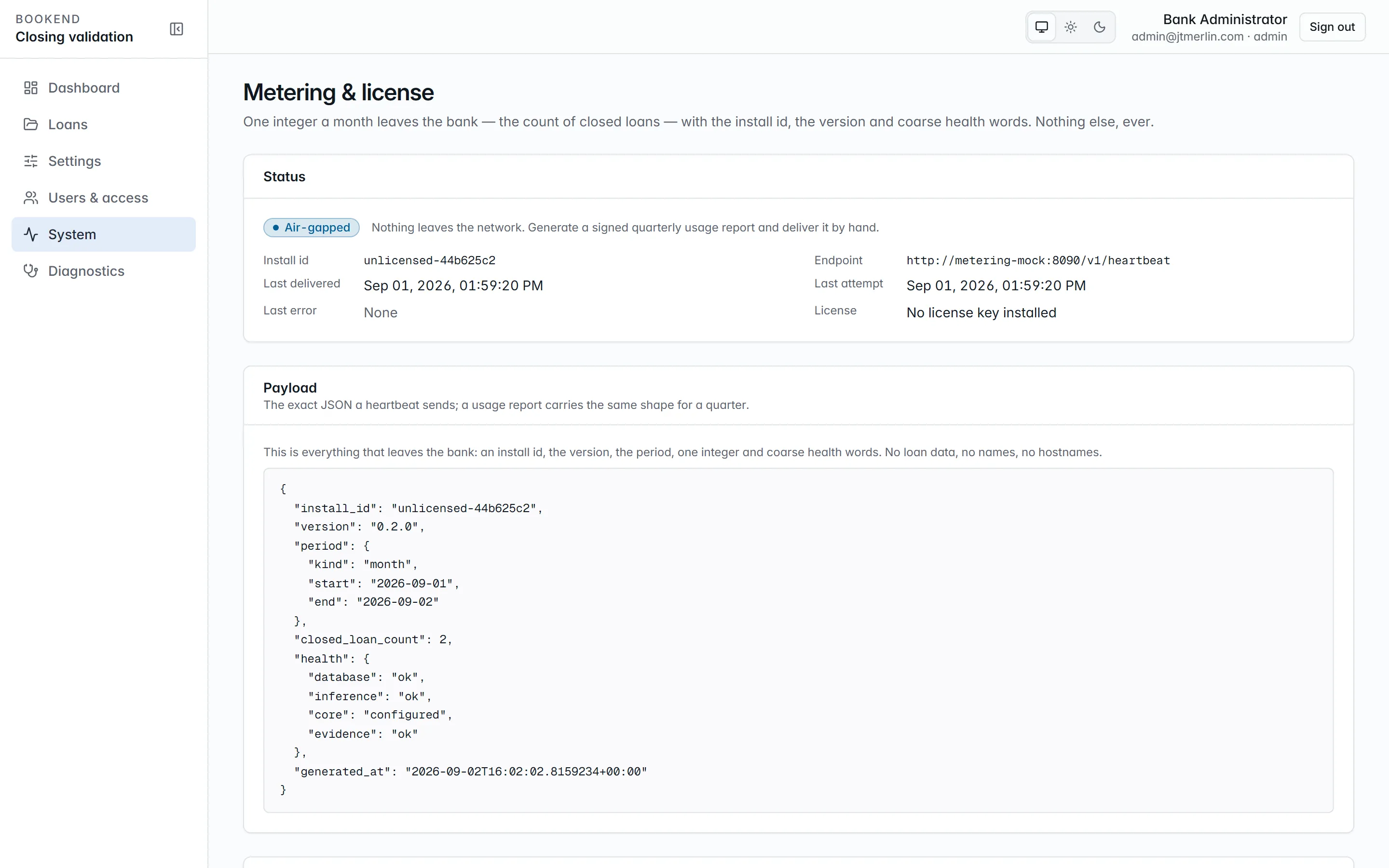
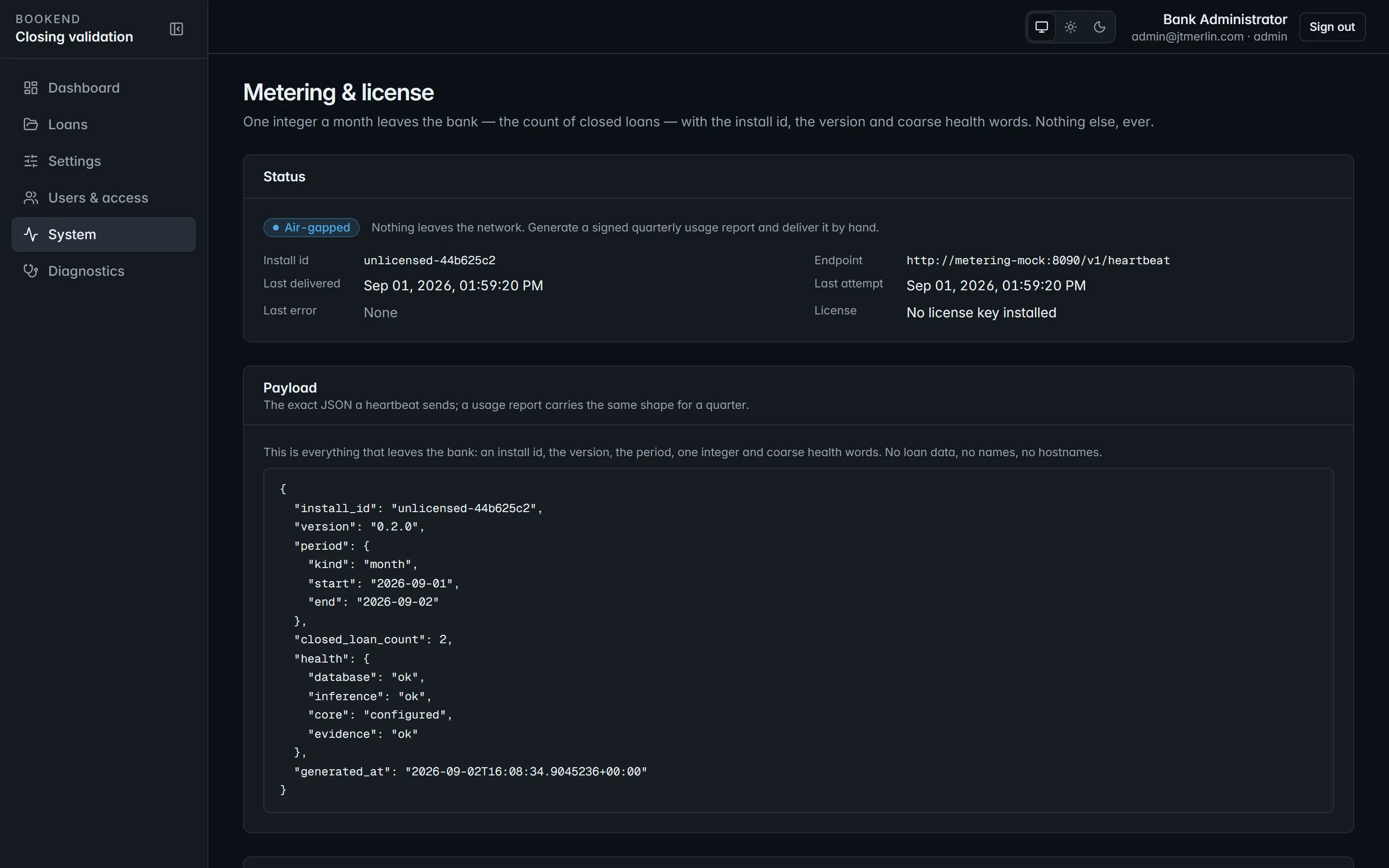
{ "install_id": "…", "version": "0.2.0", "period": { "kind": "month", "start": "2026-08-01", "end": "2026-08-29" }, "closed_loan_count": 2, "document_page_count": 27, "health": { "database": "ok", "inference": "ok", "core": "configured", "evidence": "ok" }, "license_key": "eyJhbGciOiJSUzI1NiIs…", "generated_at": "2026-08-29T18:20:35Z"}That is the whole message:
period: the calendar month to date (UTC).closed_loan_count: distinct loans sealed in the period.document_page_count: pages of every document received in the period.health: coarse status words only.inferenceandevidenceareok,degradedorunknown;coreisconfiguredornone.license_key: the installed license, so the receiver can validate it (nullwhen none is installed).
It carries no loan data, no hostnames and no user information. System → Metering & license shows the exact payload before it is sent, and the delivery history (GET /v1/metering/reports) shows every attempt, delivered or not, with the receiver’s answer, including whether it confirmed the license. A failed delivery is not retried in a loop; the next scheduled run tries again. A missed heartbeat (none delivered for 7 days while heartbeats are on) shows as a banner for administrators and managers.
Send heartbeat now (POST /v1/metering/heartbeat, administrators) sends one immediately, also when heartbeats are disabled or the install is air-gapped, for troubleshooting.
Settings
Section titled “Settings”| Setting | Meaning |
|---|---|
metering.heartbeat_enabled |
send the daily heartbeat (default on) |
metering.air_gapped |
no outbound calls at all; overrides heartbeat_enabled |
metering.endpoint |
where the heartbeat goes: https://metering.usebookend.com/v1/heartbeat unless Bookend gives you another address. Allow it in your egress rules for the api container |
metering.api_key |
secret; the metering API key, if Bookend issued one to you |
The heartbeat endpoint and air-gapped choice are set in wizard step 9 (Licensing) and can be changed later on System → Metering & license or under Settings → Other options.
Air-gapped installs
Section titled “Air-gapped installs”Set metering.air_gapped (wizard step 9 or the metering settings). Heartbeats stop. Instead, an administrator picks a quarter on System → Metering & license and uses Generate signed usage report (POST /v1/metering/usage-report?quarter=2026Q3). The report is the same payload for that calendar quarter, signed RS256 with the install’s own signing key and kept in the history, where it can be downloaded as JSON (payload, canonicalJson, signature, signatureKeyId, algorithm) for manual delivery. The signature verifies against the public key the install publishes at /v1/.well-known/jwks.json. See Air-gapped operations.
License
Section titled “License”The license key is a JWT signed by Bookend carrying the institution, tier, air-gapped flag, install id and expiry. It is entered in wizard step 9, which checks it before saving, and verified offline against Bookend’s release public key, which ships in the release bundle (see the Installation Guide). GET /v1/license reports its state; System → Diagnostics and System → Metering & license show it.
At expiry, intake goes read-only: creating a loan and uploading documents are refused with a clear message, and a banner appears for everyone. Every package already in the system keeps working: review, boarding, wires, evidence, exports.
To renew, install the new key under Settings → Other options → license → key. Intake reopens within 30 seconds, with no restart. Settings does not check the key when it is saved, so confirm the new expiry on System → Metering & license afterward. The read-only license.institution, license.tier and license.expires_at rows are refreshed only when a key is entered through the wizard’s Licensing step (PUT /v1/setup/licensing).
An install without a license key runs fully, with no expiry restriction, and reports unlicensed-… as its install id.