
Core field maps
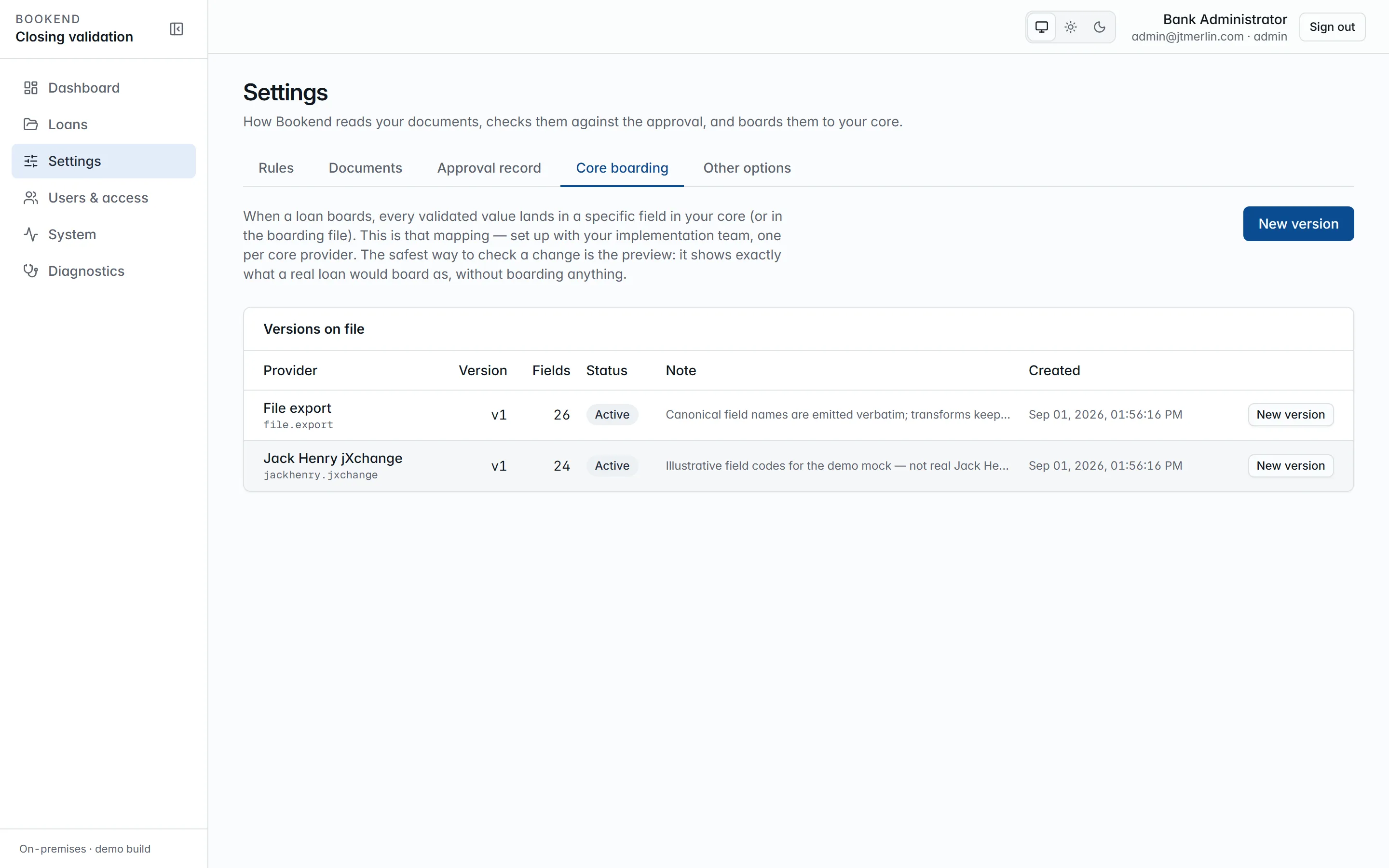
A core field map turns the canonical values of a loan into the record the core adapter posts. Maps are versioned per provider (jackhenry.jxchange or file.export); the active version for the active provider is what staging uses, and every boarding record stores the full preview it was built from and the map version, so a commit sends exactly what was approved.
Entries
Section titled “Entries”Each entry maps one canonical field to one core field with a transform:
| Transform | Result |
|---|---|
text, upper |
the value as text, optionally upper-cased |
money |
two-decimal string |
rate5 |
five-place fraction |
date_iso, date_yyyymmdd |
2026-08-27 / 20260827 |
int, bool, json |
typed scalars / the raw JSON |
list |
multi-valued fields joined with ; |
expand_list |
one core field per value, {n} in the code replaced by the index (LN-GUAR-{n}) |
bool_to_code:A,B |
A when true, B when false |
Entries can be marked required; staging refuses when a required field has no source.
Seeded maps
Section titled “Seeded maps”file.exportv1 uses the canonical field names verbatim.jackhenry.jxchangev1 uses illustrative codes (LN-ACCT,LN-PRIN,LN-RATE, …), not real Jack Henry identifiers. A bank’s implementation replaces it with a new version. See Jack Henry jXchange.
Editing
Section titled “Editing”Administrators manage maps under Settings → Core boarding, which lists every version per provider under Versions on file, the active one badged. New version opens the editor with the JSON pre-filled from the version you started from; Save version stores it as the next version (POST /v1/core-field-maps), which becomes the active map for that provider at once, and the previous version is kept for records staged with it. Maps are validated on save: every entry needs a canonical field and a core field, the transform must be a known one, and no core field may be mapped twice.
To check a map, enter a real loan reference under Preview against loan and Preview (POST /v1/core-field-maps/{id}/preview?loan=REF): it shows exactly what that loan would board as, with any required field that has no value, without boarding anything. Preview works on a saved version whose provider is the active core adapter, so preview the current version before you edit it, and the new one straight after saving.
Provenance survives the map: every field in the preview and in the staged record links back to the document, page and position of the value it came from.